ChromaFlow
Building an interactive color-generation tool for practical interface design.
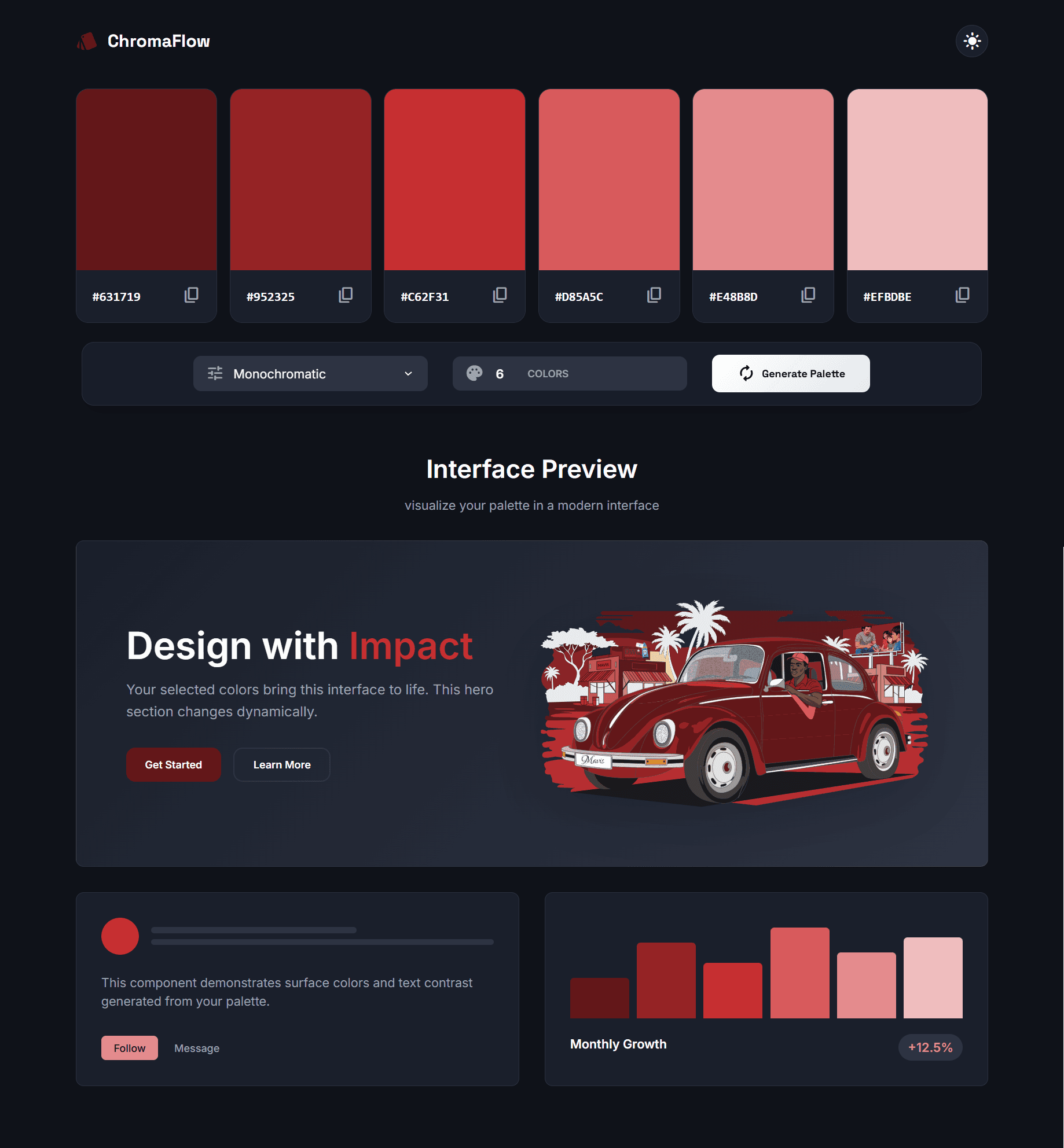
The Concept
ChromaFlow is a browser-based color-generation tool built to explore the relationship between color theory and practical interface design.
I wanted to create something more useful than a palette generator that simply returns a row of attractive swatches. Designers need to understand how colors work together, how they affect readability and how they behave when applied to actual interface components.
The project gave me a way to combine visual design thinking with hands-on JavaScript implementation.
The Problem
A color combination can look harmonious in isolation but become difficult to use when applied to text, buttons or interface backgrounds.
A palette generator also needs to do more than display colors. It should make it easy to explore alternatives and understand the effect of changing the palette.
I approached the project as an interactive design utility: generate colors, inspect the result, and immediately see how the colors work in an interface.
1. Designing the Interaction Model
The main interaction loop is deliberately direct: users generate a palette and see the selected colors applied to a live interface preview. This reduces the gap between choosing a color and understanding its practical effect.
The preview provides context that isolated color swatches cannot. Users can see how the palette influences the visual hierarchy and how different colors behave across interface elements.
2. Color Harmony and Contrast
The project explores five harmony colors and WCAG contrast considerations.
Color harmony helps generate combinations that have a visual relationship, but harmony alone does not guarantee that a palette is accessible. Contrast is a separate consideration, particularly when colors are used for text, controls and other interface elements.
The project therefore connects aesthetic exploration with the practical considerations involved in designing usable interfaces.
3. Frontend Architecture and JavaScript
I built the project using vanilla HTML, CSS and JavaScript rather than relying on a frontend framework.
HTML provides the document structure, CSS controls the visual presentation, and JavaScript handles the interactive behavior.
The palette-generation logic and interface updates are connected so that a user action produces an immediate change in the preview, managing DOM state and CSS custom properties dynamically.
4. Designing a Tool, Not Just a Demo
Even a small design utility needs a clear interaction model. The user should understand how to generate a palette, recognize which colors are being used, and see what changes when the palette updates.
I focused on keeping the interface centered on the task rather than adding unnecessary functionality that would distract from experimentation.
Key Design & Engineering Decisions
Live UI preview over static swatch bars
Applied generated palette values directly onto mock interface elements to provide immediate real-world design context.
WCAG contrast ratio score badges
Embedded instantaneous contrast ratio computations to alert creators when color choices breach accessibility standards.
Zero-dependency vanilla implementation
Crafted entirely in pure vanilla JavaScript, HTML, and CSS custom properties for instant execution with 0kB framework overhead.
Project Outcome
ChromaFlow is a live browser-based utility demonstrating interactive color generation and dynamic application of colors to an interface preview. It shows my ability to combine visual design, practical color-system considerations and direct frontend implementation using core web technologies.
“This project demonstrates that my frontend learning is not limited to reproducing static designs. I can use JavaScript to create interactions, connect user actions to interface changes and build small tools that solve a clear design problem.”
Have a project or product idea?
Let’s collaborate to craft an intuitive user journey and build it into a high-performance web or mobile experience.